


Circle
4.81.53K Reviews
App Specs
- Version
- 3.19.4
- Updated On
- License
- Free
- Downloads
- 1,000,000+
- Developer
- CircleCo Inc
- Categories
- Social
- Platform
- Android, iOS
Screenshots
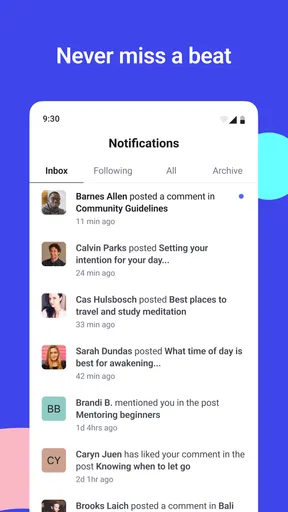
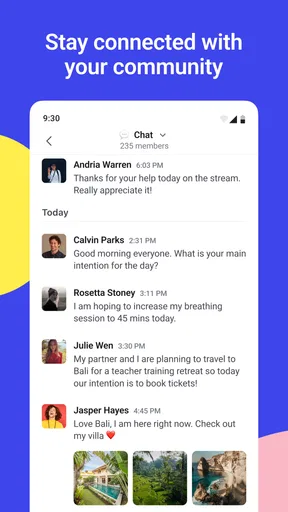
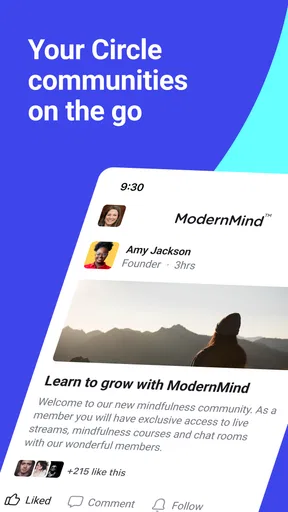


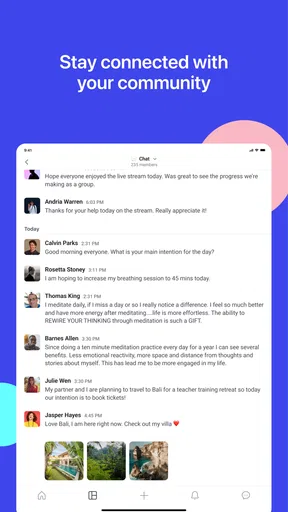
 Analysis by AppCompare
I think Circle is easiest to understand when you treat it as a place for a group to gather, rather than as another public feed to keep up with. That distinction matters: a family, a creator’s audience, or a small community can benefit from having conversations and shared material in one dedicated space. If you want a social app built around people who already have a reason to connect, Circle is worth considering; if you mainly want an open-ended stream of strangers’ posts, it may not be the right fit.
Where Circle fits in a crowded social landscape
Circle is a social app from CircleCo Inc, and its focus on communities gives it a different job from a typical messaging app. A group chat is usually quick and informal, but discussions can become hard to follow as messages pile up. A public social network is better for discovery and broad reach, yet it can mix friends’ updates with unrelated content. Circle sits between those patterns: it gives a group a defined home, with spaces for more than one topic or audience.
That structure is most useful when a group has ongoing conversations that deserve some organization. Think of a creator who wants to keep announcements separate from member discussion, or a neighborhood group that wants a calmer place to coordinate events and share photos. I would not assume that every community needs a dedicated platform, though. If everyone already checks the same group chat and the conversation is manageable, asking them to join another app may create more friction than value.
A practical routine for a small community
Imagine you help run a local reading group. You could keep one room for choosing the next book, another for meeting logistics, and a third for casual recommendations. That separation makes it easier for someone who missed a few days to find the relevant thread without scrolling through every off-topic message. It also helps a new member understand where to ask a question instead of wondering whether they are interrupting the main conversation.
For a creator, the same principle can help keep recurring updates distinct from discussion. I would make the room names plain and purposeful rather than clever: people should be able to tell where to post at a glance. A small amount of organization at setup can prevent the common problem of creating too many spaces, then leaving members unsure which one is active. Start with the few categories your group genuinely uses, and add more only when a real need appears.
It is also worth agreeing on a simple posting rhythm before inviting a large group. If people know whether a space is for announcements, questions, or informal sharing, they are less likely to duplicate posts across rooms. That is not a technical trick; it is a community habit that makes any platform easier to use. Circle can provide the structure, but the people in the space still need to make it welcoming and useful.
Who is likely to get the most from it
I would look at Circle if you are coordinating a community whose members need to return to the same conversations over time. It can make sense for a hobby group, a private membership, a creator-led community, or a family that wants a more organized home for sharing. The key is that people have a reason to come back and that someone is willing to keep the space active. A community platform feels empty when its organizer sets it up and then rarely gives members a reason to participate.
Worth Reading Before You Choose

Switching to Android Auto Means Rethinking Your Driving Routine

Google Calendar Makes a Crowded Week Easier to Manage

Baby Panda World Brings Quick Play to Modern Phones, but Its Game Library Feels Busy

ESPN’s Live Game View Makes Following Close Games Easier

QuizzLand Review: A Good Fit for Short Trivia Breaks, Not Every Player

Basketball Stars: Multiplayer Is Fast, but Can It Recover When Matches Go Wrong?
On the other hand, I would skip it if your priority is finding new people through a large public feed, following breaking news, or sending occasional one-to-one messages. Those jobs are better served by services designed around public discovery or direct messaging. Circle’s value is less about reaching everyone and more about giving a particular group a shared place. If your audience is scattered across several services and reluctant to change habits, test the idea with a small, willing group before trying to move everyone.
How to judge the setup before committing
One useful test is to ask what problem the app will solve that your current tools do not. If the answer is simply “we need somewhere to chat,” an existing messaging app may be enough. If the answer is “we need separate, easy-to-find places for recurring discussions and community updates,” a dedicated platform has a clearer case. That question can save you from building a space that looks organized but does not improve anyone’s day.
Invitations deserve a little thought too. Contact syncing may make it easier to find people you already know, but I would still invite only those who are relevant to the group and explain why the space exists. A personal invitation with a clear purpose is more considerate than adding people simply because they appear in an address book. It also gives newcomers a better first impression and sets expectations before they arrive.
Circle is free, which lowers the barrier to trying it, and its Teen content rating makes it suitable for a teen audience under the relevant platform’s age guidance. It has a 4.7 average from around 64,000 ratings, with over a million installs. Those figures suggest that it has found an audience, but they do not tell me whether a particular community will thrive there. The practical test is whether your members find the space easier to use than the alternatives they already know.
What is Circle?
At its core, Circle is a social app that’s designed to keep you connected with your friends and family in a more meaningful way. Unlike other social media platforms, which sometimes feel like a chaotic blend of news, ads, and random updates, Circle focuses on creating a more intimate and personal space for communication. It’s kind of like having a private club just for the people you care about.
Getting Started with Circle
Installing Circle was a breeze. Available on both Android and iOS, the app is just a quick download away from the Google Play Store or the Apple App Store. Once installed, setting up an account was straightforward. They’ve kept the process simple, which I appreciate because let’s be honest, nobody wants to fill out endless forms just to chat with friends.
After setting up, you can invite your friends and family to join your circle. The app lets you sync contacts, making it super easy to find and connect with people you already know. This feature was a lifesaver for me, sparing me from manually entering each contact.
The Features That Make Circle Stand Out
Circle has a bunch of features designed to make communication personal and engaging. The standout for me was the customizable chat rooms. You can create different rooms for different groups, whether it’s family, close friends, or your book club. Each room can be personalized with themes and emojis, adding a fun and personal touch to your chats.
Another cool feature is the ability to share moments through photos and videos. It’s like having a private Instagram, where you can share those special memories without broadcasting them to the entire world. The app also supports video calls, which have come in handy for those times when a text just won’t cut it.
Privacy and Security
In today’s digital age, privacy is a big deal. Circle takes this seriously by implementing strong privacy measures. Your chats and media are encrypted, and you have control over who sees your content. The app doesn’t bombard you with ads, which is a huge plus in my book since it keeps the experience focused and distraction-free.
Circle also allows you to set privacy levels for each chat room, so you can decide who can join and what they can see. This level of control is reassuring, especially if you’re protective of your personal space.
Why You Might Love Circle
What I love most about Circle is its simplicity and focus on real connections. It’s not trying to be everything to everyone. Instead, it does a few things really well, and that’s what makes it stand out. Whether you’re looking to keep your family updated with daily snapshots or want a private space to chat with friends, Circle offers a platform that prioritizes genuine interaction over superficial engagement.
The app is also a great alternative for those who are tired of the noise of traditional social media. If you’ve ever felt overwhelmed by the constant stream of information and irrelevant updates, Circle might be the breath of fresh air you need. It’s about quality, not quantity, and that’s something I can get behind.
Final Thoughts
In a world where social media can sometimes feel impersonal and chaotic, Circle offers a refreshing change. It’s the app that brings you closer to the people you care about, without the unnecessary clutter. If you’re looking for a way to enhance your digital interactions, Circle is definitely worth a try. So go ahead, give it a spin, and see how it transforms your online social life.
Whether you’re looking to keep things simple or want a more intimate space to connect, Circle is ready to welcome you with open arms. Download it, invite your friends, and start sharing those precious moments today!
Version, continuity, and what to keep in mind
The current version is 3.18.1, and Circle was released on December 8, 2022. That gives the app an established history rather than the feel of a brand-new experiment, but a version number by itself is not a changelog. I would not infer a particular new feature or redesign from it. For someone already using Circle, the practical point is to keep the app current through their device’s store and check that the people they rely on can access the same community spaces.
For a new user, Circle’s evolution matters less than whether its basic community model matches your routine. Existing members should be cautious about changing room organization just for the sake of tidiness: moving conversations around can make familiar posts harder to find. If you manage a group, tell members when you change a room’s purpose and keep important recurring information in a predictable place. That small bit of communication can matter more than adding another category.
Circle requires Android 7.0 or later on Android devices. Before inviting a group, I would check that the people you expect to include can install and use the app on their phones. A platform is only convenient if it works for the whole group; if several members have incompatible or older devices, a widely available messaging service may be a better common denominator.
Trade-offs that show up after the first week
A dedicated community space can reduce the clutter of a busy chat, but it introduces a separate destination members have to remember to visit. This is the main adoption trade-off I would watch. A lively group may happily check another app, while people who already feel overloaded by notifications may ignore it. I would begin with one clear purpose and avoid treating every conversation as urgent, so the space earns attention instead of demanding it.
Room customization can help people recognize where they are, but it cannot replace useful moderation. If a community grows, someone still needs to welcome newcomers, steer repeated questions toward the right place, and keep the tone civil. Before choosing Circle for a group with sensitive discussions, decide who will handle access and community expectations. The app’s controls can support a boundary, but a group’s rules and judgment define how that boundary works in practice.
I would also be deliberate about photos and videos. A private space can feel more personal than a public feed, yet members should still think before sharing something they would not want circulated beyond its intended audience. It is sensible to agree on what belongs in the group, especially when people are sharing family or community moments. Privacy settings are useful, but good habits remain part of protecting people’s comfort.
Questions worth settling with your group
Will Circle replace an existing chat, or sit alongside it? I would make that decision explicit. Running two spaces for the same conversation can split replies and leave members unsure where to look. If you keep both, assign them different jobs—for example, use one for quick coordination and the other for organized, continuing discussions—so there is a reason for each to exist.
Who should be invited, and how will newcomers understand the rooms? Contact syncing can make finding familiar people easier, but it does not decide who belongs in a particular community. I would invite deliberately, explain the purpose in the invitation, and give people a simple orientation once they join. This is especially helpful for family groups where not everyone is equally comfortable with apps or room-based conversations.
Does the group need a private community or a public audience? If discovery and broad reach are central, a public social network is the more natural tool. If members already know why they are gathering and want a defined place for discussion, Circle is a more plausible fit. That distinction is more useful than trying to rank social apps in general: the best option depends on whether your goal is finding people or serving a community you already have.
My recommendation
I would try Circle with a small, active group before making it the home for a large community. Set up only the rooms you can explain in a sentence, share a few useful posts, and see whether members return without being repeatedly chased. If they do, the organization may be solving a real problem. If participation fades, that is a sign to simplify the setup or return to the tool the group already uses.
For creators and organizers, the strongest reason to choose Circle is the possibility of giving a community a more intentional place than a fast-moving group chat or a broad public feed. For casual users who only need occasional messages, it may be an unnecessary extra app. My recommendation is conditional but positive: use it when your group needs structure and shared continuity, and skip it when a simpler channel already keeps everyone connected.
Pros
- User-friendly interface for easy navigation.
- Seamless integration with social media platforms.
- Customizable notifications to suit preferences.
- Supports multiple languages for wider accessibility.
- Regular updates ensure app functionality.
Cons
- Limited offline functionality can be restrictive.
- Some features require in-app purchases.
- Occasional bugs in older devices.
- Heavy on battery usage during prolonged sessions.
- Limited customization in app themes.
FAQs for Circle
What is Circle and how does it work?
Circle is an innovative app designed to streamline your social media interactions by aggregating all your accounts into one platform. It allows you to view and engage with your feeds, post updates, and manage notifications seamlessly from a single interface. The app offers a user-friendly dashboard that supports integration with major social media networks, ensuring a cohesive and efficient user experience.
Is Circle safe to use with my social media accounts?
Yes, Circle is designed with security in mind. It uses encryption to protect your data and adheres to strict security protocols to ensure your social media accounts are safe. The app requires minimal permissions, and users can control which accounts and data are integrated. Regular updates are issued to address any security vulnerabilities and improve user safety.
Can I customize the notifications I receive through Circle?
Absolutely. Circle offers extensive customization options for notifications. Users can choose which social media alerts are important and set preferences for each account individually. Whether you want instant notifications for direct messages or only occasional updates on posts, Circle provides the flexibility to tailor alerts to suit your needs without overwhelming you.
Does Circle support all social media platforms?
Circle supports a wide range of popular social media platforms, including Facebook, Twitter, Instagram, and LinkedIn. However, some lesser-known or newer platforms might not be fully integrated yet. The development team is continuously working to expand compatibility, so users can expect more platforms to be added in future updates.
Is there a cost to use Circle?
Circle offers a free version with basic features, which is sufficient for most users. For those looking for enhanced functionalities, such as advanced analytics and additional customization options, a premium version is available through a subscription. This pricing model allows users to choose a plan that best suits their needs and budget.


